A two or four node cluster is limited by the fabric between the boxes, not by the cards inside them. Everyone building their first training machine asks the same thing: InfiniBand, or is 100GbE enough? Below are the datasheet figures, the setup work each option really needs, and the point where Ethernet stops being the cheaper answer.
In brief
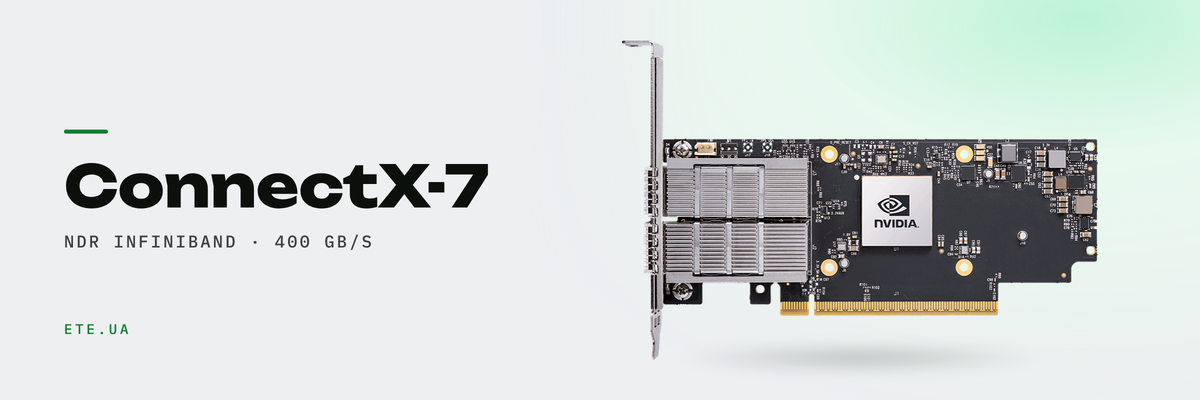
- ConnectX-7 delivers 400Gb/s per port and 330 to 370 million RDMA messages per second, with a PCIe Gen5 host interface
- A VPI card switches between InfiniBand and Ethernet through mlxconfig, so the protocol is not locked in at purchase
- An InfiniBand fabric will not come up without a subnet manager. The MQM9700 has one on board for up to 2,000 nodes, the MQM9790 does not
- RoCE on Spectrum switches takes one command, nv set qos roce, and the default mode is lossless with PFC and ECN
- One OSFP cage on Quantum-2 carries 800Gb/s, which is two NDR ports of 400. That is why 32 cages give 64 ports, and why you need splitter cables
What actually travels between nodes
Inside a node the cards talk over NVLink and PCIe, and the network never sees that traffic. What leaves the box is one thing: synchronisation. At every training step the nodes exchange gradients, and while that exchange runs, the maths waits. This is why cluster networking is measured in small messages per second rather than in file copy speed.
Inference behaves differently. When the model fits into the memory of one node, almost nothing crosses the fabric: a request arrives, an answer goes back, the neighbouring machines never hear about it. Four such nodes live happily on ordinary Ethernet, because the network is serving users rather than the maths.
The line is crossed when the model no longer fits into a single node. Weights are then split across machines, and every generated token drags traffic over the wire. That is where latency starts costing money.
ConnectX-7 by the datasheet
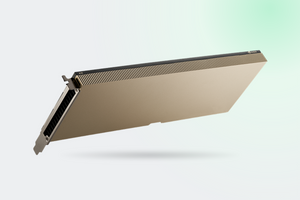
The NVIDIA datasheet lists a maximum total bandwidth of 400Gb/s, compliance with IBTA specification 1.5, one to four network ports and a PCIe Gen5 host interface of up to 32 lanes. RDMA message rate is given as 330 to 370 million messages per second. The silicon carries acceleration engines for collective operations, MPI All-to-All, MPI tag matching and a programmable datapath accelerator.
That last line matters more than it looks. Collectives running on the adapter mean part of the all-reduce work happens in the network instead of on the host CPU. On Ethernet the same work falls back to software.
One card, two protocols
Confusion starts with the price list, where «400GbE (default mode) / NDR IB» reads like two different cards on one line. It is one card. A ConnectX port switches between InfiniBand and Ethernet through a firmware setting; the mlxconfig documentation describes it as LINK_TYPE_P1, value 1 for InfiniBand and 2 for Ethernet. A reboot applies the change, and that is the whole procedure.
The practical takeaway is short. If you are undecided, buy the VPI card and settle the question later on a live workload. Getting it wrong costs a reboot, not a new purchase order.
| Model | Modes | Ports | Best for |
|---|---|---|---|
| MCX75310AAS-NEAT | NDR InfiniBand, 400Gb/s | 1 × OSFP, PCIe 5.0 x16 | multi-node training |
| MCX715105AS-WEAT | 400GbE or NDR, switchable | 1 × QSFP112, PCIe 5.0 x16 | when the protocol is still open |
| MCX755106AS-HEAT | 200GbE or NDR200 | 2 × QSFP112, PCIe 5.0 x16 | redundancy or two separate fabrics |
| MCX713104AS-ADAT | 25 and 50GbE, Ethernet only | 4 × SFP56, PCIe 4.0 x16 | storage, VDI, management |
InfiniBand needs a subnet manager
This is where a first cluster loses a day. On Ethernet you power the switch on and the link comes up. An InfiniBand fabric has to be given addresses and routes first, and until that happens the ports light up while no traffic moves. The MLNX_OFED documentation puts it plainly: a subnet manager must be running on the fabric at all times, it can run on any node or on a switch, and OpenSM ships as part of OFED.
That is the real difference between two switches which look identical in a catalogue. The MQM9700 is internally managed, with a subnet manager on board that, according to the QM97XX documentation, brings up a fabric of up to 2,000 nodes with nothing else installed. The MQM9790 is externally managed and expects UFM or OpenSM on one of your servers. Lower price, higher administration effort.
Both share the rest of the specification: 64 non-blocking NDR ports and up to 51.2Tb/s of aggregate bidirectional throughput, 32 OSFP cages, and port-split for up to 128 NDR200 ports. Third generation SHARP runs collectives inside the network. Power draw from the documentation: the MQM9700 is rated 747W typical and 1,720W maximum, the MQM9790 640W and 1,610W. Size the rack feed for the maximum, not the typical figure.
Two nodes do not need a switch at all. Connect the cards back to back, run OpenSM on one host, and the fabric works. The catch is that this host becomes a single point of failure: reboot it and its neighbour loses its routes.
Ethernet needs preparation too
The «Ethernet is simpler» argument holds right up until RDMA has to run on it. RoCE over an unconfigured switch will drop packets on the first burst, and training slows down enough to make InfiniBand look cheap in hindsight.
The good news is that on Spectrum switches running Cumulus Linux this is one command. The Cumulus documentation gives nv set qos roce followed by nv config apply. The default is lossless mode: PFC on switch priority 3 plus a dedicated RoCE buffer pool. Lossy mode keeps ECN only, signalling congestion per RFC 3168. The same page states what people forget: the end hosts must support RoCE, the switch alone decides nothing.
From our catalogue, the MSN4600-CS2FC on Spectrum-3 offers 64 QSFP28 ports running anywhere from 1 to 100GbE, a workable spine for a 100GbE cluster. The MSN3420-CB2RC on Spectrum-2 carries 48 SFP28 ports and 12 QSFP28 ports, giving 25GbE to the nodes and 100GbE uplinks. For the management network there is the MSN2201-CSMRC with 48 RJ45 ports. A separate management network looks like an indulgence until the first night the main fabric goes down and nobody can reach the servers.
Cables hide half the budget surprises
On NDR an OSFP cage carries 800Gb/s, which is two 400Gb/s ports. That is exactly why 32 physical cages on Quantum-2 present 64 NDR ports. The purchasing consequence: the cable from switch to nodes is usually a splitter, one OSFP at the switch end and two connectors at the adapters. Counting one cable per node means ordering twice what you need.
Inside a rack the answer is passive copper: no power draw, no heat. Past a few metres active copper takes over, and beyond that optics with transceivers and MPO12 patch cords. What we hold in stock sits in the NVIDIA networking section: 800Gb/s splitters, DAC and AOC assemblies at 100 and 200Gb/s, SR4 transceivers and NDR optical kit.
When Ethernet is enough
| What you run | Network | Reasoning |
|---|---|---|
| Inference, model fits in one node | 25 or 100GbE | the fabric carries user requests, not weights |
| VDI, rendering, video work | 25GbE to the node, 100GbE uplink | the bottleneck is storage, not synchronisation |
| Fine-tuning across two nodes | 200GbE with RoCE, or NDR200 back to back | there is traffic, but not yet a fabric worth of it |
| Training on four nodes or more | NDR with Quantum-2 | all-reduce every step, where SHARP and adaptive routing earn their keep |
| Model sharded across nodes | NDR only | every token crosses the wire and users feel the latency |
What this article does not promise
We will not quote a speed-up percentage for your model. The gain from InfiniBand depends on how much of a training step is communication, and that differs between 8B and 70B, between a full fine-tune and LoRA. The honest version: if your nodes spend most of their time computing, the difference shows up only in a profiler log. If they spend it waiting on each other, you will see it in hours per epoch.
Second, an InfiniBand fabric costs more than the switch. Add adapters, splitter cables, optics if the racks are apart, and somebody who can read ibdiagnet output. For two inference nodes that structure never pays for itself.
These models are in our catalogue


Let us size the fabric for your cluster
Tell us how many nodes you plan, which cards go inside and what runs on them. We will pick the adapters, the switch and the cabling, and say where InfiniBand would not pay off in your case.
Talk to an engineer