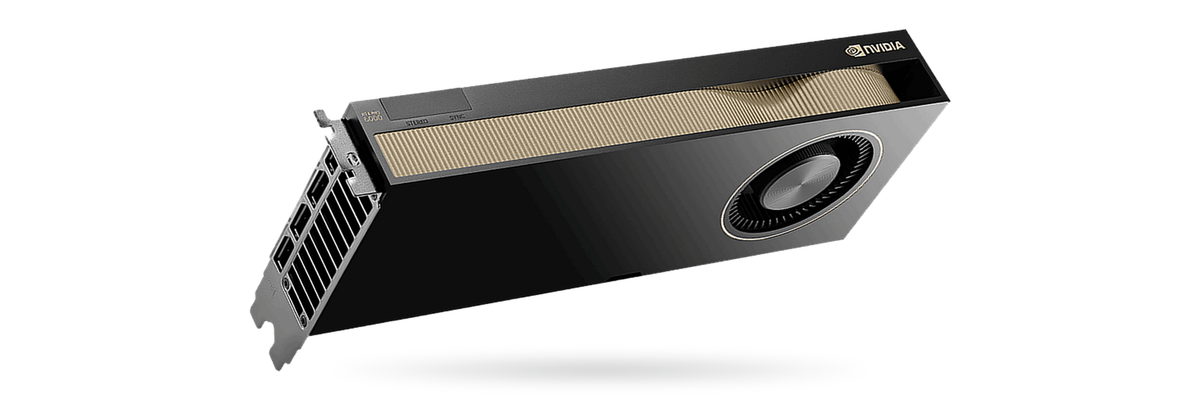
Choosing between the RTX PRO 6000 Max-Q and the Workstation Edition comes down to three questions: how many cards go into one chassis, where the machine stands and whether you need virtual machines with vGPU. For a single card in a deskside workstation, take the 600 W Workstation Edition, since the Max-Q trails it by 5-14% in rendering. For two to four cards in one case, or a tight power budget, take the 300 W Max-Q. For an eight-card rack or vGPU, the answer is the passively cooled server version, made to order. All three carry the same 96 GB of GDDR7, so a model that fits on one of them fits on any of them.
The full spec sheet lives in our comparison of the RTX PRO 6000 Workstation, Max-Q and Server Edition. This article is a decision tree instead: seven typical situations, the version that fits each one, and the numbers on wall power, airflow and noise behind the answer.
In brief
- Every version has 24,064 CUDA cores, 96 GB of ECC GDDR7 and a 512-bit bus; the Workstation and Max-Q reach 1,792 GB/s, the server card 1,597 GB/s.
- Workstation Edition: 600 W, 125 TFLOPS FP32, a flow-through cooler; workstation makers fit one or two of them per machine.
- Max-Q: 300 W, 110 TFLOPS FP32, a rear-exhaust blower; NVIDIA rates it for up to four cards per system, or 384 GB in total.
- For LLM text generation the Max-Q gives up very little because memory bandwidth is identical; in rendering, Puget Systems measured it 5-14% behind.
- A four-card Max-Q workstation pulls roughly 1.8-2 kW at the wall by our estimate, which one 16 A circuit at 230 V can carry.
- vGPU exists only on the server version; MIG with up to four instances works on all three under Linux.
Both desktop versions are in stock at ETE: the RTX PRO 6000 Max-Q and the RTX PRO 6000 Workstation Edition, shipped by Nova Poshta anywhere in Ukraine.
Three questions that settle the choice
Answer these before you compare teraflops. They rule out the wrong options faster than any spec table.
- How many cards will share one chassis, today and a year from now? One: either desktop version works. Two: the Max-Q, or the Workstation Edition in a case built for two 600 W cards. Three or four: the Max-Q only.
- Where will the machine stand? Under a desk in an office: a tower workstation with Max-Q or Workstation cards. In a server cabinet: a server whose chassis maker lists that exact card. A rack server does not belong next to people; it stays loud even at idle.
- Do you need virtual machines that each get a slice of the GPU? If yes, that is vGPU, and NVIDIA supports it only on the server version. If containers or processes on one Linux host are enough, MIG on a Max-Q or Workstation card will do.
If two options survive all three questions, the power outlet and the type of work break the tie: rendering and simulation benefit from 600 W, language models barely do.
Seven scenarios and the answer for each
| Scenario | Deciding factor | Version |
|---|---|---|
| 1. One card for rendering, simulation or video | single-card speed | Workstation |
| 2. One card for a local LLM | bandwidth, wall power, plans for a second card | Max-Q or Workstation |
| 3. Two cards, 192 GB | heat inside the case | Max-Q; Workstation only in a case rated for two 600 W cards |
| 4. Three or four cards in a workstation, 288-384 GB | airflow | Max-Q |
| 5. Office with no server room, UPS, power outages | wall power | Max-Q |
| 6. Four-card rack server | chassis maker's GPU list | Max-Q if the chassis lists it; otherwise the server version, made to order |
| 7. Eight cards, vGPU, virtual desktops | passive cooling, vGPU | server version, made to order |
1. One card for rendering, simulation or video. This is where the full 600 W pays off. The Workstation Edition delivers 125 TFLOPS FP32 against the Max-Q's 110, and in Puget Systems' July 2025 review the Max-Q came in 5-13% slower in Blender, Octane, Redshift and V-Ray and around 14% slower in DaVinci Resolve effects and Unreal Engine. A ready-made option is the ETE workstation with one RTX PRO 6000 Workstation on a Threadripper PRO 7975WX.
2. One card for a local language model. Each generated token requires the card to stream the model weights from memory, so response speed tracks bandwidth, and both versions have 1,792 GB/s. The Max-Q falls behind when it processes a long prompt, because that stage is bound by Tensor Cores running at a lower clock: 2,280 MHz versus 2,617 MHz. If a second card is on the roadmap, buy the Max-Q: it puts half the heat into the case and leaves room to grow. If the same machine also renders, buy the Workstation Edition. A single-Max-Q system is available as ETE AI Chat L.
3. Two cards with 192 GB. A second Workstation Edition breathes air the first one has already heated, which is why makers offer two of them only in select models such as the Dell Pro Precision 9 T6. Two Max-Q cards give the same 192 GB on 600 W combined and push their heat out through the rear bracket. The RTX PRO 6000 has no NVLink, so two cards never become one memory pool: the model is split across them over PCIe 5.0 x16. A ready configuration is the ETE workstation with 2× Max-Q.
4. Three or four cards in one workstation. There is no choice here: Max-Q only. HP lists up to four Max-Q cards for the Z8 Fury G6i, Lenovo does so for the ThinkStation PX, and Dell allows up to five 300 W RTX PRO cards in the Pro Precision 9 T6. Four cards packed side by side need a chassis designed around them; the airflow section below explains why.
5. An office with no server room, a UPS and a generator. During outages the workstation runs on a UPS or a generator, and every 300 W per card counts. For each 96 GB of GPU memory the Max-Q needs 300 W instead of 600, so the same UPS keeps the machine up longer or supports more cards. The math is below.
6. A four-card rack server. A Max-Q in a rack chassis makes sense when the chassis maker includes it in its compatible GPU list, which means the slot layout, fan profile and cables have been validated. The ready ETE option is the server with 4× Max-Q and 384 GB. It belongs in a server room: makers declare GPU rack servers at 8.5-9.1 bels of sound power under load.
7. Eight cards, vGPU, virtual desktops. The passive server version is cooled by the server's own fans and scales to eight cards in 4U chassis. It is also the only one of the three with vGPU. Talk this one through before picking hardware, because licensing, the hypervisor and three-phase power all depend on it: by our estimate a server with eight 600 W cards draws about 6.3 kW.
Airflow: why 600 W cards stop at two and 300 W cards reach four
The Workstation Edition uses two axial fans that push air through the heatsink and release it inside the case. With one card that works well. With two, 1,200 W of heat stays in the chassis until the case fans remove it, and the second card inhales air the first one has warmed.
The Max-Q uses a blower that pulls air from inside the case and exhausts it out the back through the bracket, which is what allows four cards to sit next to each other. A blower pressed against its neighbor, however, has little room to draw air. In October 2025 Puget Systems capped its desktop builds at three Max-Q cards with a gap between them, and Exxact reported in March 2026 that four tightly packed cards throttled without its custom airflow and held the full 300 W with it.
| Parameter | Workstation Edition | Max-Q |
|---|---|---|
| Cooling | two fans, flow-through | blower, rear exhaust |
| Where the heat goes | into the case | out through the bracket |
| Size, dual slot | 137 × 305 mm | 112 × 267 mm |
| Cards per workstation in makers' lists | 1-2 | up to 4 |
| What to check | case airflow, a 600 W cable | gaps between cards, front intake |
The takeaway for buyers: look beyond the card itself and confirm that the chassis maker lists this exact number of these exact cards.
Outlet, UPS and generator: how much the workstation draws
Our method is the rated power of the cards and the processor plus 15% for memory, drives, fans and power supply losses. We assume a 350 W processor, the rating of the Threadripper PRO 7975WX.
| Configuration | GPU memory | Cards, W | At the wall, our estimate |
|---|---|---|---|
| 1 × Max-Q | 96 GB | 300 | about 0.75 kW |
| 1 × Workstation | 96 GB | 600 | about 1.1 kW |
| 2 × Max-Q | 192 GB | 600 | about 1.1 kW |
| 2 × Workstation | 192 GB | 1,200 | about 1.8 kW |
| 4 × Max-Q | 384 GB | 1,200 | 1.8-2 kW |
A 16 A circuit at 230 V supplies 3,680 W, or 2.94 kW if you plan at 80% load. A four-card Max-Q machine fits on it; a second such machine or the office printers on the same breaker do not, so ask your electrician which outlets share a circuit. Size the UPS with headroom above the wall draw, and size the generator to carry the workstation plus a UPS that is recharging. Every watt the machine draws ends up as heat in the room, so the air conditioning has to run all year, nights included. More detail is in our article on powering a multi-GPU workstation.
One more trap applies to the Workstation Edition. The card reads the SENSE pins of its 12V-2x6 connector, and if the power supply cable reports 450 W, the card caps itself at 450 W; running nvidia-smi -pl 600 then has no effect. You need a power supply with a native 600 W 12V-2x6 cable for each card. For the 300 W Max-Q, this limit is irrelevant.
What the Max-Q gives up at 300 W, and where you will not notice
Halving the power costs clock speed, not memory: a 2,280 MHz boost against 2,617 MHz puts FP32 and AI TOPS about 12% lower, while the 96 GB, 512-bit bus and 1,792 GB/s stay the same. Rendering, simulation, long-prompt processing and fine-tuning feel the gap; text generation barely does. The numbers per workload, and whether a Workstation Edition capped at 300 W can stand in for a Max-Q, are in our RTX PRO 6000 Max-Q specs article. Which models fit does not depend on the version; the sizing math is in our guide to how much VRAM an LLM needs.
With several cards, the slot matters as well. StorageReview recorded 27% fewer tokens per second from the same pair of Max-Q cards in a workstation where the second card sat in a PCIe 4.0 slot, and attributes the drop to the slots and the processor together. Make sure every card gets a PCIe 5.0 x16 slot.
Racks, virtualisation and MIG: when you need the server version
MIG splits any of the three versions into as many as four isolated instances: four of 24 GB, two of 48 GB or one of 96 GB. It runs on Linux only and needs driver 575.51.03 or newer, a current vBIOS and a switch to compute mode. In that mode the display outputs go dark, so the monitor has to hang off another card. MIG instances serve containers and processes on a single host, for example several developers each with their own Jupyter environment.
Virtual machines with a share of the GPU need vGPU, and of the three versions only the server card is on NVIDIA's list. It is passive, works only inside a server whose fans push air through it, and has 1,597 GB/s, so by our estimate its ceiling for generation speed is about 11% lower. If your workload truly needs vGPU or eight cards in one chassis, get in touch and we will discuss the passively cooled server version, made to order. How many VMs fit on one card is covered in our article on MIG and vGPU.
What to check before you order
- Chassis. The maker should list this card in this quantity.
- Card power. For the Workstation Edition, a dedicated native 600 W 12V-2x6 cable per card.
- Slots. PCIe 5.0 x16 for every card; four cards need 64 PCIe 5.0 lanes from the CPU, which Threadripper PRO and the larger Xeon W chips provide.
- Circuit and UPS. A dedicated 16 A circuit for a four-card machine, plus a UPS and generator with headroom.
- Growth. If a second, third or fourth card may follow within a year, start with the Max-Q.
FAQ
RTX PRO 6000 Max-Q vs Workstation: which is better for LLMs?
For text generation the difference is small: both have 96 GB and 1,792 GB/s. The Workstation Edition is faster at long-prompt processing and fine-tuning. If you plan two to four cards, choose the Max-Q.
How much slower is the Max-Q than the Workstation Edition?
On paper FP32 is 12% lower, 110 versus 125 TFLOPS. In Puget Systems' tests of rendering and video applications the Max-Q was 5 to 14% behind.
How many RTX PRO 6000 Max-Q cards fit in one workstation?
NVIDIA rates it for up to four, or 384 GB. HP and Lenovo list four for specific workstation models. Workstation Edition cards appear in workstations one or two at a time.
Does the RTX PRO 6000 Max-Q support vGPU?
No. NVIDIA supports vGPU only on the server version. MIG works on the Max-Q under Linux, with up to four 24 GB instances.
What ETE supplies for this
- PNY NVIDIA RTX PRO 6000 Blackwell Max-Q 96 GB: in stock, shipped by Nova Poshta across Ukraine; for two- to four-card workstations and offices with limited power.
- PNY NVIDIA RTX PRO 6000 Blackwell Workstation Edition 96 GB: in stock; one card at the full 600 W for rendering, simulation and fine-tuning.
- ETE AI Code L: a workstation with 2× Max-Q and 192 GB.
- ETE AI Chat XL: a server with 4× Max-Q and 384 GB for a team.
We supply PNY cards with a 36-month warranty, invoiced for bank transfer with VAT, and provide the paperwork public institutions and tenders require. The current price is on the product page.
Not sure which RTX PRO 6000 fits your setup?
Tell us how many cards you plan now and in a year, where the machine will stand, what power circuit and UPS you have, and which models or applications you run. ETE will recommend the version and propose a workstation or server for the job, and on request ETE / Vixen.UNO engineers will set up drivers, CUDA, vLLM or Ollama.