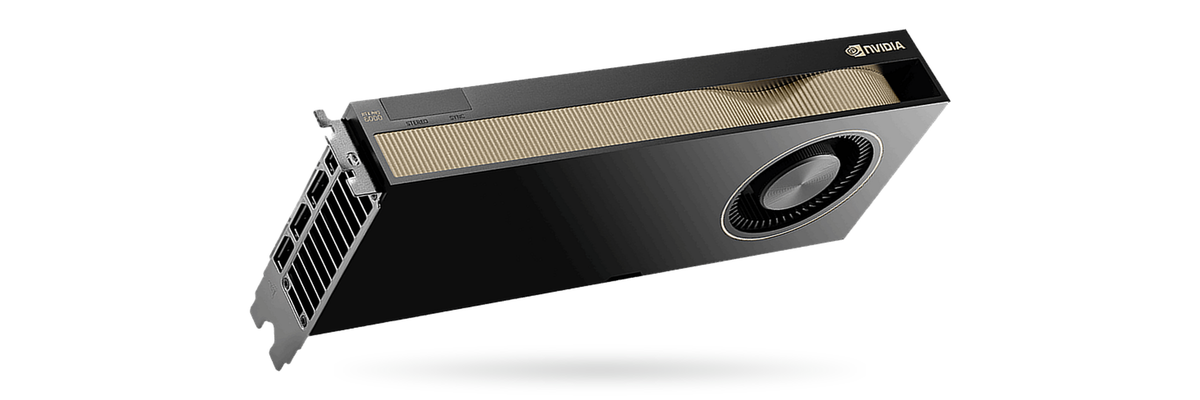
You can run an NVIDIA RTX PRO 6000 Blackwell Max-Q in a rack server, provided the chassis vendor lists the card as compatible for that exact model. Its 300 W blower pulls air across its own heat sink and pushes the exhaust out through the bracket, so in a front-to-back server it cooperates with the chassis fans instead of fighting them. As of November 2026 the vendor lists are short: Lenovo's 2U servers take two or three cards, 5U rack-mount workstations take up to four, and Supermicro's 4U GPU servers name the Max-Q without saying how many. For virtual machines with vGPU or a 24/7 service for the whole company, the passively cooled server version is the more logical choice.
The full spec sheet for all three editions is in our Workstation vs Max-Q vs Server Edition comparison. This article sticks to the rack: airflow, how many cards fit in 2U and 4U, why the vendor list matters, dual power supplies, and noise and heat in the server room. The Max-Q is in stock at ETE: the PNY NVIDIA RTX PRO 6000 Blackwell Max-Q, with a 36-month warranty.
In brief
- The Max-Q has 96 GB of GDDR7 with ECC, 1,792 GB/s, 300 W, a dual-slot design and a blower that exhausts through the bracket; in a server, that bracket should face the hot aisle.
- The Server Edition is passive, with 1,597 GB/s and up to 600 W, so the Max-Q offers roughly 12% more memory bandwidth at half the power.
- Lenovo's option guide LP2364 lists the Max-Q for the 2U SR655 V3 and SR665 V3 (value 3) and, since November 17, 2026, for the SR650 V4 (two cards).
- Four Max-Q cards draw 1,200 W; by our estimate the whole server pulls about 2.0 kW from the wall, and each of the two power supplies must carry that alone.
- vGPU, NVIDIA AI Enterprise and the NVIDIA-Certified Systems list cover only the Server Edition; the Max-Q can be split with MIG into four 24 GB slices under Linux.
How the Max-Q blower fits server airflow
A rack server moves air from the front panel to the rear. Fans in the middle of the chassis draw cool air from the cold aisle and push warm air into the hot aisle. The passive Server Edition has nothing but a heat sink and depends entirely on that stream, which is why server vendors size their fans and ducting so that each card gets enough air.
The Max-Q handles its own cooling. The blower draws air from inside the case, forces it along the fins and expels it through the vented bracket. When the GPUs sit on risers at the rear of the chassis, the brackets point backward and the blower exhaust follows the direction of the server airflow. If a chassis mounts its cards with the brackets facing the front panel, the blower works against the server fans, and the Max-Q does not belong there.
| Edition | Cooling | Where the heat goes | Power | Best fit |
|---|---|---|---|---|
| Workstation Edition | two fans, flow-through | largely into the case | 600 W | workstation with one or two cards |
| Max-Q | blower | out through the bracket | 300 W | workstation with up to 4 cards, server on the vendor list |
| Server Edition | passive heat sink | carried off by server fans | up to 600 W, 300 W minimum | GPU server with 2-8 cards |
Source: NVIDIA product pages and datasheets for the three editions, Server Edition product brief SP-12355; read in October 2026.
Dense risers have one weak spot: blowers packed shoulder to shoulder. Puget Systems observed in July 2025 that a blower card barely warms its neighbors, yet a card pressed against another has little room to breathe in; an empty slot between cards helps, as do strong system fans feeding the gaps. Exxact, in an article updated in March 2026, describes four Max-Q cards that throttled in a stock build and held their full 300 W only after a cooling rework, at temperatures up to 85 °C. Inside a server, the middle cards are most at risk because they have neighbors on both sides.
How many Max-Q cards fit in 2U, 4U and rack workstations
The card is full height, dual slot and 267 mm (10.5 in) long, so it physically fits any full-size PCIe 5.0 x16 slot. What sets the count is not the size but what the chassis vendor has tested and documented.
| System | Form factor | Max-Q per vendor document | Server Edition |
|---|---|---|---|
| Lenovo ThinkSystem SR655 V3 | 2U | 3 (value not defined) | not supported |
| Lenovo ThinkSystem SR665 V3 | 2U | 3 (value not defined) | not supported |
| Lenovo ThinkSystem SR650 V4 | 2U | 2 (since 11/17/2026) | we did not check |
| Lenovo ThinkStation PX | tower, or 5U on rails | four at most | absent |
| HP Z8 Fury G6i | workstation, 5U on rails | four at most | absent |
| Supermicro SYS-422GA-NRT | 4U GPU server | named, quantity not given | 8 |
| Supermicro SYS-322GA-NR | 3U GPU server | named, quantity not given | named |
| HPE ProLiant DL380a Gen12 | 4U GPU server | absent | eight at most |
Source: Lenovo Press LP2364 (versions of May 8 and November 17, 2026) and LP2263, Lenovo PSREF for ThinkStation PX, HP and Supermicro specifications, HPE QuickSpecs; read October 24, 2026, with the SR650 V4 row from the LP2364 version of November 17, 2026.
2U. A realistic 2U build carries two to four Max-Q cards. Lenovo allows two or three. Puget Systems, a US system builder, sells a 2U LLM server with four Max-Q cards, two redundant 2,600 W supplies and a note that power-supply redundancy requires 240 V. Before buying a build like that, ask which chassis it uses and whether that chassis vendor lists the Max-Q.
4U with eight positions. Supermicro rates the SYS-422GA-NRT for eight dual-slot 600 W cards at a 35 °C inlet and lists the Max-Q without a count. Eight blowers with no gaps is exactly the layout that gave Puget and Exxact cooling trouble, so without Supermicro's confirmation a safer plan is four Max-Q cards in alternate positions. Going to eight is covered in our guide to an eight-card Max-Q server.
5U rack workstation. The ThinkStation PX and Z8 Fury G6i are towers on rails that hold four Max-Q cards; on the ThinkStation PX the BMC is only an option.
What the vendor compatibility list gives you
When a server vendor adds the Max-Q to a model's list, it has validated the slot layout, the fan profile and the cabling. Lenovo's LP2364 ships the card without power cables, since they differ per server, and names a separate thermal kit for each model with the parts needed for installation. The same guide states plainly that vGPU is not supported, there is no NVLink and the DisplayPort outputs are disabled by default.
Without that listing you take on three risks. First, fans: if the BMC cannot read GPU temperature, it will not spin the fans up under load, and those fans are what feed the blowers. Second, the 16-pin (12V-2x6) cables, which you must match to each slot and power supply yourself. Third, support: a server vendor has no obligation to treat an untested configuration as its own. The NVIDIA-Certified Systems list of October 4, 2026 contains Server Edition systems but not a single Max-Q one.
Power: dual supplies, 230 V, UPS and generator
Three Max-Q cards draw 900 W, four draw 1,200 W and eight draw 2,400 W, counting the cards alone. By our estimate (cards plus CPUs plus 15% for everything else), a server with four Max-Q cards and two 280 W AMD EPYC 9355 processors pulls about 2.0 kW at the wall; with eight cards and two 360 W EPYC 9555 chips, about 3.6 kW.
- 1+1 redundancy. Each of the two power supplies must handle the full load by itself. For four Max-Q cards that means units rated at 2 kW or more, ideally with headroom.
- Circuit. A 230 V, 16 A circuit loaded to 80% delivers 2.94 kW. One such circuit per supply is enough for four Max-Q cards; eight cards need 32 A or three-phase power.
- Blackouts. Size a double-conversion UPS for the full server load with a margin, and make sure the generator powers both the server and the server-room air conditioning. Without cooling, the room heats up fast and the Max-Q blowers are the first to throttle. During long outages you can lower the card power limit with
nvidia-smi -pl, if your card's Min Power Limit allows it (checknvidia-smi -q -d POWER); NVIDIA publishes no lower bound for the Max-Q.
Circuit, cable and UPS sizing for multi-GPU machines is covered in our article on powering a multi-GPU workstation.
Noise and heat in the server room
Nearly all the power a server consumes turns into heat. A four-card Max-Q server dumps about 2 kW into the room, and the air conditioning has to remove that with a margin for summer. We found no published noise measurements for Max-Q servers, but 2U and 4U chassis are loud under load and the card blowers add to it. Put such a server in a server room or a ventilated rack cabinet; for an office, a tower workstation is the better option.
Many server BMCs offer a fan profile that boosts airflow across the PCIe zone. Turn it on for the Max-Q: the blowers breathe air from inside the chassis and need a steady supply, not fans that react only to CPU temperature.
Max-Q or Server Edition: when the Max-Q makes sense
| Criterion | Max-Q | Server Edition |
|---|---|---|
| Cooling | blower, bracket exhaust | passive, server fans |
| Power | 300 W | up to 600 W, 300 W minimum |
| Memory and bandwidth | 96 GB at 1,792 GB/s | 96 GB at 1,597 GB/s |
| FP32 | 110 TFLOPS | 120 TFLOPS |
| MIG | four instances of 24 GB | same as the Max-Q |
| vGPU | absent from NVIDIA's list | from release 19.0 |
| Servers on vendor lists | a handful | many models with 2, 4 and 8 cards |
| At ETE | in stock | made to order |
Source: Max-Q datasheet 5349650 (June 2026), Server Edition brief SP-12355, NVIDIA vGPU supported GPU list (October 29, 2026).
Both editions carry 96 GB, so they hold the same models and the same number of sessions. Using our rule (0.9 of the memory the driver reports, minus 3 GiB per card), four cards serve 156 concurrent Llama 3.3 70B FP8 conversations at 8K context (two tensor-parallel pairs, FP8 KV cache) or 241 gpt-oss-120b conversations at 32K context spread over all four. Our private ChatGPT sizing guide for 100 to 2,000 employees translates that into headcount.
A Max-Q in a rack is a sound choice when:
- the chassis vendor lists the card for that model and those slots;
- the server runs bare-metal Linux for one team or one service, and the cards are shared via MIG, Slurm or Kubernetes;
- the power budget is tight and 96 GB at 300 W matters;
- developers already use Max-Q workstations and want to move the same containers into the server room unchanged.
The Server Edition is the better fit for virtual machines with vGPU (on a Max-Q a VM only gets a whole card via passthrough), NVIDIA AI Enterprise support, eight cards in a dense node, and a wide choice of chassis. If that describes your workload, let's talk it through. MIG on the Max-Q requires Linux, a driver from 575.51.03 and a vBIOS from 98.02.6A.00.00 onward, plus switching the card to compute mode with the DisplayModeSelector tool, which turns off the display outputs; see our MIG and vGPU article for details.
What to check before ordering and after installation
- Vendor GPU list for the exact chassis model, ideally with a Max-Q count.
- Slot layout: can you leave an empty position between cards?
- PCIe lanes: four cards at x16 use 64 lanes before any NICs or NVMe drives.
- 16-pin cables from the vendor's kit for every slot.
- Power supplies: each one carries the full load on its own.
- Airflow direction: card brackets face the hot aisle.
- BMC reads GPU temperature and ramps the fans.
- Rack depth and rails: GPU chassis are long, so leave room for cabling.
After installation, run the server for several hours with every card fully loaded at once, for example vLLM inference with many parallel requests. Run nvidia-smi -q -d PERFORMANCE to see why clocks drop, and read each card's temperature via nvidia-smi -q -d TEMPERATURE, paying most attention to the inner cards. A thermal slowdown flag means the card is short of air. On request, ETE / Vixen.UNO engineers will set up the driver, CUDA, NVIDIA Container Toolkit, vLLM and MIG.
FAQ
Can the RTX PRO 6000 Max-Q go in a rack server?
Yes, if the server vendor lists the Max-Q for that model. The blower exhausts through the bracket, so in a front-to-back chassis with the brackets toward the hot aisle it works together with the fans. Verify the GPU list, the cables, the spacing between slots and the BMC fan control.
How many Max-Q cards fit in a 2U server?
Two to four, depending on the model. Lenovo lists three for the SR655 V3 and SR665 V3 and two for the SR650 V4, and some builders sell 2U systems with four. The chassis vendor's list sets the count, not the number of slots.
Max-Q or Server Edition for a rack?
The Max-Q suits bare-metal Linux in a chassis on the vendor list: 300 W and 1,792 GB/s. The Server Edition is passive, with 1,597 GB/s and up to 600 W, and it is the only one of the three that supports vGPU and NVIDIA AI Enterprise. For virtual machines and dense eight-card nodes, it is the more logical fit.
Will a blower-style GPU work in a rack server?
It does when it draws air from inside the chassis, exhausts into the hot aisle and the server fans give it enough intake air. Cards packed tightly together starve each other at the intake, so an empty slot between them helps.
What power does a server with four Max-Q cards need?
The cards take 1,200 W, and the whole server with two EPYC 9355 CPUs comes to about 2.0 kW by our estimate. Each of the two supplies must carry that alone, and one 230 V, 16 A circuit per supply is enough. In Ukraine, add a UPS and a generator that also runs the air conditioning.
What ETE supplies for this
- PNY RTX PRO 6000 Blackwell Max-Q Workstation Edition, 96 GB: in stock, delivered by Nova Poshta across Ukraine; the card for a chassis whose vendor lists the Max-Q, current price on the product page.
- Custom AI server: chassis, slots, cables and power supplies selected for the Max-Q, with a compatibility check before the quote.
- ETE AI Chat XL: a four-card Max-Q server with 384 GB of GPU memory for an internal chat assistant and team LLMs.
- ETE AI Code XL: the same four-card Max-Q class for coding assistants and agents.
Will the Max-Q fit your chassis?
Send us your server or chassis model, the number of cards you plan, the models you want to run and how many people will use them at once, plus the power circuit and UPS available in your server room. ETE will check the compatibility list, slots, cables and power, and propose a Max-Q configuration or tell you straight that your workload needs a passive card. We accept bank transfer with VAT, provide documents for public institutions and tenders, and every card carries a 36-month warranty.